Editorial Minimalist — Dark Portfolio Template
Dark editorial portfolio template built with Astro & Tailwind CSS v4. Minimal design, bold typography. Perfect for designers, photographers & art directors.
Secure checkout via Gumroad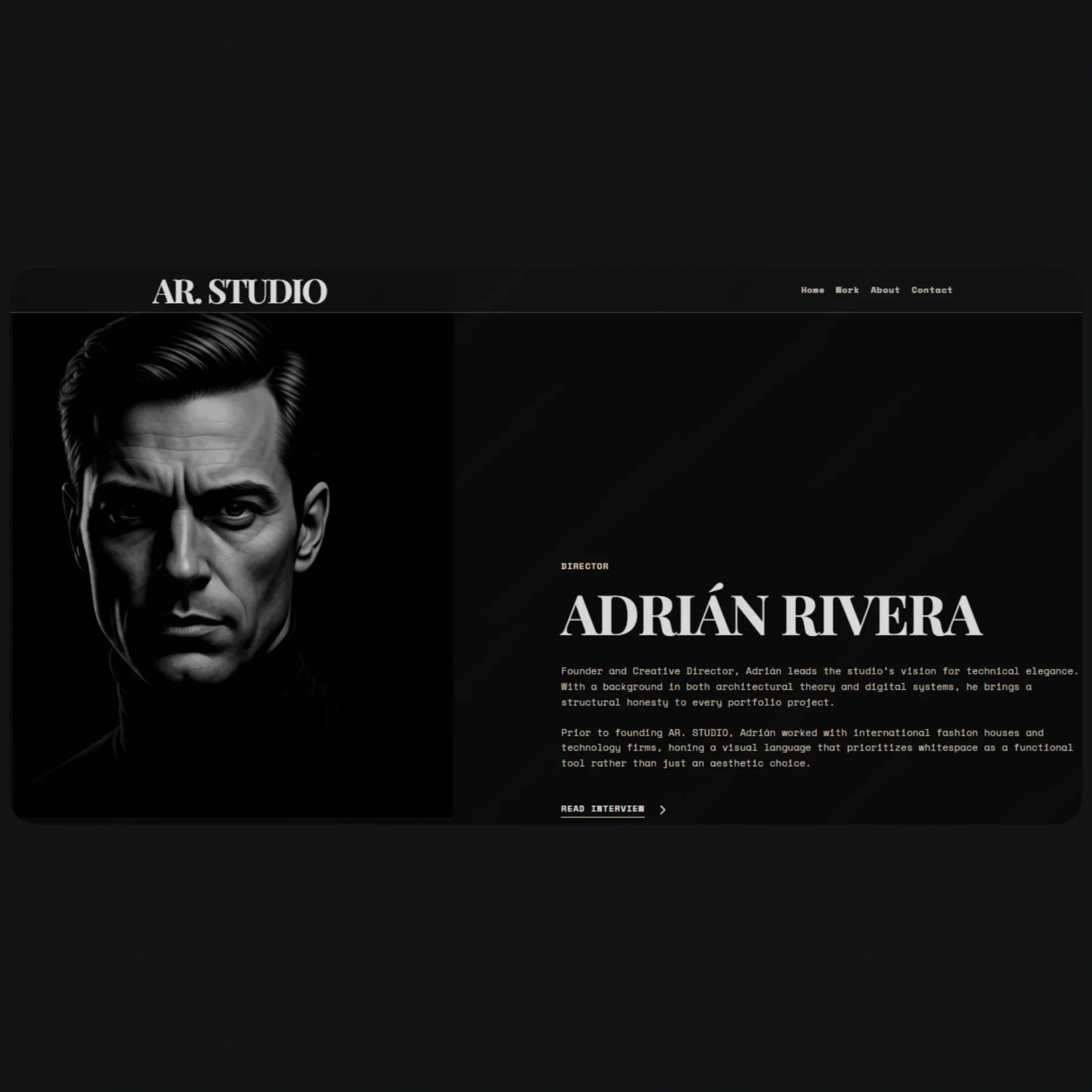
Overview
Editorial Minimalist Portfolio is a dark, typography-first portfolio template built with Astro and Tailwind CSS v4 — engineered for creative professionals who want their work to speak without distraction. Inspired by the visual language of high-end design magazines, every layout decision prioritizes negative space, oversized serif headlines, and a strict monochromatic system that forces your projects to become the focal point. Whether you're a graphic designer, art director, photographer, or frontend developer, this template gives you a production-ready foundation that loads fast, ranks well, and makes an immediate impression.
The template ships with four fully designed pages — Home, Work, About, and Contact — each following the same editorial grammar: large display typography anchored asymmetrically, monospaced UI labels, and a near-black background with warm off-white text. The work index page uses a hover-reveal interaction where project thumbnails appear as the cursor moves over each title row, a pattern common in award-winning portfolio sites. The About page includes a sticky portrait column, a scrolling client marquee, and a compact fact grid. The Contact page is intentionally sparse — the emptiness is the design.
Under the hood, all personal content is centralized in a single data.ts file, making customization fast and systematic. Colors are managed entirely through CSS custom properties in global.css, so rebranding the template to a different accent or background takes under two minutes. Full TypeScript support with strict mode enabled, semantic HTML5 structure, and per-page metadata via Astro's built-in head management make this template both developer-friendly and SEO-ready out of the box.
Stack
| Layer | Technology | |---|---| | Framework | Astro v6 | | Styling | Tailwind CSS v4 | | Language | TypeScript (strict mode) | | Markup | HTML5 semantic | | Fonts | Fonts Source (Google) |
Project Structure
/
├── public/
│   └── icons/
│       ├── arrow-forward.svg
│       └── icon-menu.svg
│
├── src/
│   ├── components/
│   │   ├── Navbar.astro
│   │   └── Footer.astro
│   │
│   ├── layouts/
│   │   └── Layout.astro
│   │
│   ├── pages/
│   │   ├── index.astro        ← Homepage
│   │   ├── work.astro         ← Work index (hover-reveal)
│   │   ├── about.astro        ← About + clients marquee
│   │   └── contact.astro      ← Minimal contact page
│   │
│   ├── styles/
│   │   └── global.css         ← CSS custom properties + base styles
│   │
│   └── lib/
│       └── data.ts            ← All personal content & metadata
│
├── astro.config.mjs
├── tailwind.config.ts
├── tsconfig.json
└── package.json
Quick Start
1. Install dependencies
npm install
2. Run the dev server
npm run dev
Open http://localhost:4321 in your browser.
3. Build for production
npm run build
4. Preview the build
npm run preview
Customization
Personal content — src/lib/data.ts
This is the only file you need to edit to personalize the template. It contains:
- Name and tagline
- Bio paragraphs for the About page
- Project list (title, category, year, image, description)
- Client list for the marquee
- Social media links
- Contact email
- Per-page SEO metadata (title + description)
// Structure example
export const siteData = {
  name: "Your Name",
  tagline: "Design & Direction",
  email: "hello@yourdomain.com",
  social: {
    instagram: "https://instagram.com/...",
    linkedin: "https://linkedin.com/in/...",
    behance: "https://behance.net/...",
  },
  projects: [
    {
      index: "01",
      category: "BRANDING",
      title: "Project Name",
      year: "2025",
      image: "/images/project-01.jpg",
      description: "A one-line project description.",
    },
  ],
  clients: ["Client A", "Client B", "Client C"],
};
Colors — src/styles/global.css
The entire color system is managed through CSS custom properties. To retheme the template, update these variables:
:root {
  --color-bg: #0a0a0a;          /* Main background */
  --color-text: #f0ede8;        /* Main text */
  --color-accent: #c8b8a2;      /* Single accent color */
  --color-border: rgba(255, 255, 255, 0.1);
  --color-muted: rgba(240, 237, 232, 0.45);
}
Typography — src/layouts/Layout.astro
Fonts are loaded via Google Fonts in the main layout <head>. To swap them, replace the Google Fonts link and update these variables:
--font-display: 'Playfair Display', serif;   /* Headlines */
--font-mono: 'DM Mono', monospace;           /* UI / labels */
Project images
Place your images in public/images/ and reference them from data.ts as /images/filename.jpg. Use .webp format for better performance. Minimum recommended resolution: 1200×800px.
SEO Setup
Each page receives its metadata from src/lib/data.ts and injects it via Layout.astro using Astro's native head management API.
Available variables per page
export const pageMeta = {
  home: {
    title: "Your Name — Portfolio",
    description: "155-character description with keywords...",
  },
  work: {
    title: "Work — Your Name",
    description: "...",
  },
  about: {
    title: "About — Your Name",
    description: "...",
  },
  contact: {
    title: "Contact — Your Name",
    description: "...",
  },
};
Auto-generated tags
Layout.astro injects the following tags on every page:
<title>— browser tab title and Google result headline<meta name="description">— search engine snippet<meta property="og:title">— Open Graph title for social previews<meta property="og:description">— Open Graph description<meta property="og:image">— preview image (set indata.ts)<link rel="canonical">— canonical URL to avoid duplicate content
Additional recommendations
- Add a
sitemap.xmlby enabling the official integration:@astrojs/sitemap - Use
public/robots.txtto control what crawlers index - Project images already include descriptive
altattributes via the card component
Final Notes
- Performance: Astro generates static HTML by default — zero unnecessary client-side JS. The template scores 95+ on Lighthouse with no additional configuration.
- No UI framework dependencies: No React, Vue, or any component framework. Everything that requires JavaScript (hover interactions, marquee, mobile menu) is implemented in vanilla JS scoped inside
.astrofiles. - Dark mode only: The template does not include a light mode. The dark theme is part of the design system, not a configurable option.
- Extensibility: To add individual case study pages, duplicate
work.astro, use the same header pattern, and add the route todata.ts. - Recommended deployment: Vercel and Cloudflare Pages are the simplest options for static Astro sites. Connect your repo and every push deploys automatically.
Template available at formaui.site/templates/editorial-minimalist-portfolio